Give an assistant a creative objective, not a list of editing chores. With Shuffll Engage, it can develop concepts, organize scenes, coordinate voice and visuals, attach artwork, inspect results and revise the next step. Your application supplies the business context; the agent coordinates the available creative tools.
REST connects Engage to your software. MCP gives compatible assistants discoverable tools with structured inputs and outputs. Use both around the same business workflow, choosing the operations exposed to your authorized workspace.
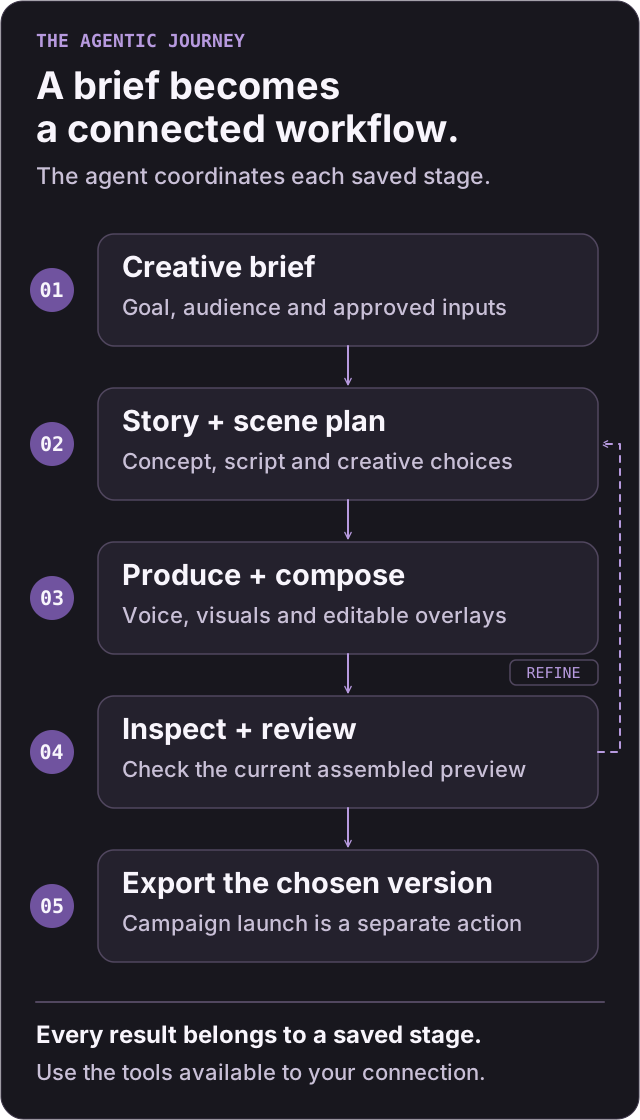
A journey keeps the brief, creative selections and related artifacts together. A concept is a creative direction; a storyboard turns that direction into scenes and scripts. Scene media, overlay artwork and previews each have their own saved state, so an agent can inspect what exists before deciding what to do next.
Plan a launch campaign for our outdoor collection. Develop two concepts, then a three-scene story for the stronger one. Use approved product imagery, natural movement, clear narration and a restrained product overlay. Prepare English and Spanish versions. Show the storyboard before generating media, then bring me a preview to review. Keep customer contact data in our system and ask before any paid generation or campaign launch.
This is an example brief, not a claim that one request automatically completes every stage. The assistant turns the brief into available tool calls, checks their results and brings back the requested decisions.
| Step | What happens | Tools to discover in a journey-enabled workspace |
|---|---|---|
| Save the brief | Preserve the objective, language and organization context | journeys_create, journeys_get, journeys_update |
| Develop the story | Save concepts, storyboards, scripts and creative selections | journey_authoring_save, journey_authoring_get, journey_authoring_select |
| Connect inputs | Map the audience/product fields needed for the workflow | journey_sources_create, journey_sources_import, journey_personalization_save |
| Check the audience | Test mappings and freeze a reviewable audience revision | journey_personalization_test, journey_audience_snapshot_create |
| Prepare a sample | Resolve the selected storyboard and an eligible sample | journey_preview_prepare |
| Produce scene media | Request reference images, narration and motion; inspect the returned jobs | journey_images_generate, journey_voice_generate, journey_motion_generate |
| Attach artwork | Save editable scene overlays | journey_overlays_save, journey_overlays_get |
| Assemble and inspect | Build a live preview and inspect the exact source recipe | journey_preview_generate, journey_preview_get, journey_preview_inspection_get |
| Review and export | Review current artifacts, then export the selected preview | journeys_checkpoint_review, journey_preview_export, journey_export_get |
Discover the live tool catalog before building against these names. Journey tools are described here as a workflow guide; the checked-in REST reference documents a separate, bounded campaign contract. A tool visible in one connection is not automatically available through every REST endpoint or workspace. Scope and access explains how to choose the right contract.
The following is an illustrative MCP tool call for saving a brief. Replace the synthetic organization ID with your authorized organization. It saves the request; it does not generate media.
{
  "name": "journeys_create",
  "arguments": {
    "operation_id": "docs-outdoor-launch-brief-001",
    "organization_id": "11111111-1111-4111-8111-111111111111",
    "title": "Outdoor collection launch",
    "brief": "Develop a three-scene product story using approved outdoor collection assets. Show concepts and storyboard before paid media generation.",
    "language": "en"
  }
}
Use the returned state to continue. Read the current journey before editing it; pass its required revision and idempotency values to the next mutation according to that tool's schema.
An agent can choose routine creative options within the brief, compare alternatives and prepare revisions. Approvals bind to the actual artifacts being reviewed. Changing an upstream choice can make a dependent preview or review stale; inspect the current state rather than treating an old approval as permission for a new version.
Keep these milestones distinct:
- Saved: the brief, storyboard or artwork exists.
- Generated: a requested scene artifact has completed.
- Previewed: the assembled version has a live preview to inspect.
- Exported: a completed MP4 exists for the selected version.
- Launched: a separate campaign action has been authorized and accepted.
For recovery and observability, retain journey, artifact and job IDs. Honor polling guidance, inspect failures and retry the intended operation instead of starting duplicate work. See jobs and retries.
| Control | Why it matters |
|---|---|
| Current revisions | An edit targets the version you actually read |
| Stable operation identity | An uncertain retry can preserve the intended action instead of creating duplicate work |
| Artifact dependencies | Changing the story or media can invalidate the affected preview and review |
| Frozen audience snapshots | A campaign review can refer to an exact audience and plan revision |
| Durable jobs and receipts | The integration can distinguish queued, failed, uncertain and completed work |
| Separate launch review | A configured launch can bind the audience, export, channel, schedule and spend ceiling before dispatch |
For journey-enabled campaign delivery, the implemented sequence prepares a review, tests the configured channel, approves the exact current review and starts a separate launch. Availability and required evidence depend on the configured deployment. An accepted provider request remains distinct from independently confirmed delivery; unknown outcomes need reconciliation rather than blind resending.
Choose suitable catalog music beneath speech, inspect the pacing and use supported source trims to fit the story. Preserve complete speech and the paired audio of actor-speaking scenes. A trim control is not an automatic silence detector.
For transitions, discover the current catalog and use only a returned style on its supported scene shapes. Do not assume an effect shown in a schema is available at every boundary or that a preview proves final MP4 parity. Inspect the composition you intend to export.